⭐ What is a Chat System?
A chat system lets two or more users send messages in real-time.
Example: WhatsApp, Slack, Instagram DM, Messenger.
To design it, you must handle:
- Message delivery
- Storing messages
- Online/offline users
- Read receipts
- Scalability
⭐ Basic Architecture (Simple Version)
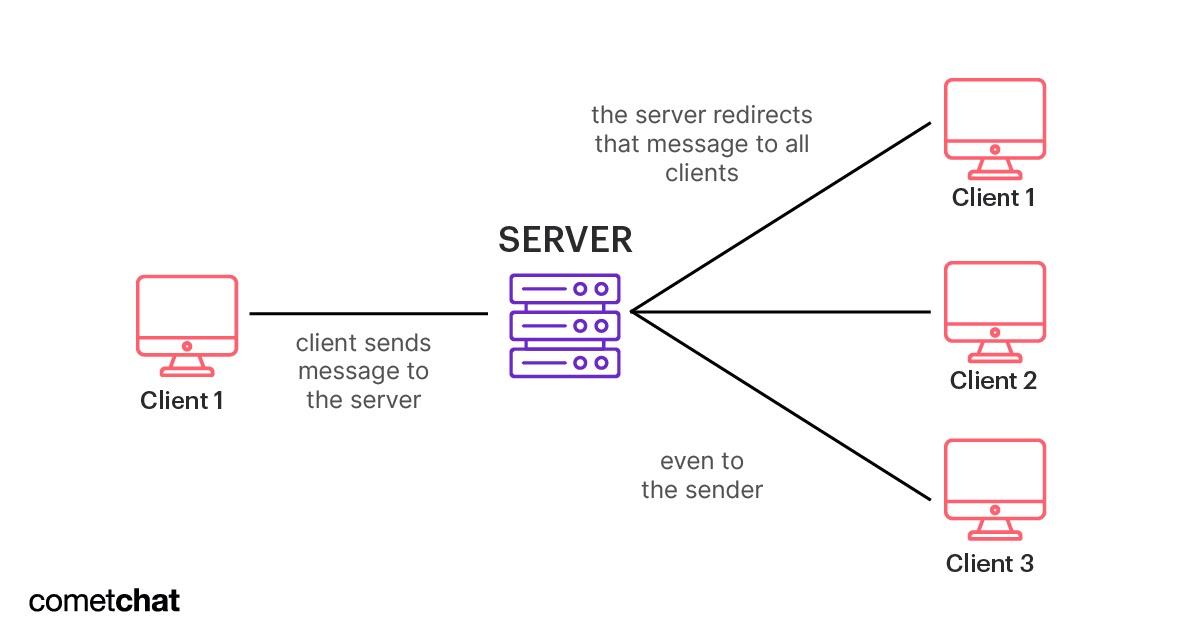

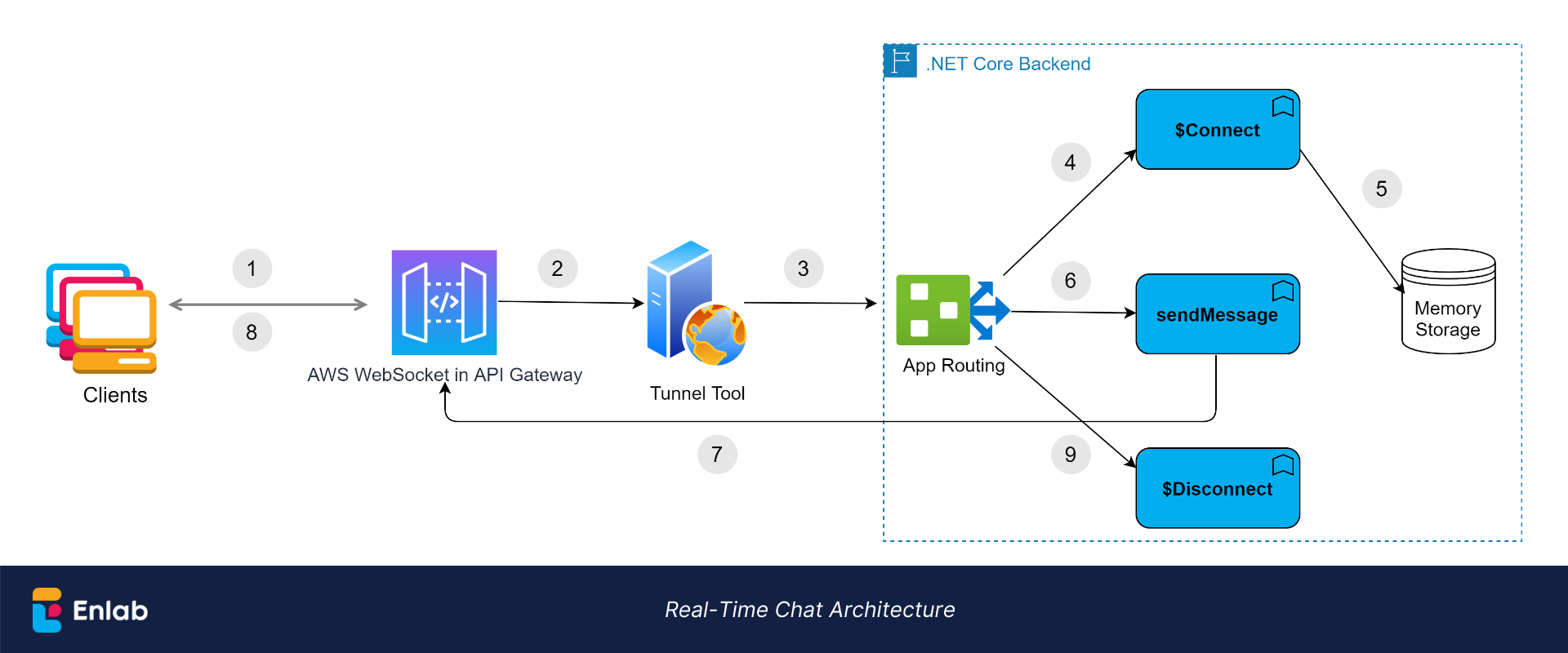

A simple chat system has:
1️⃣ Client (mobile/web app)
- Shows messages
- Connects to server using WebSockets
- Sends message events
2️⃣ WebSocket Gateway
- Manages active connections
- Sends real-time messages to online users
- Each connected user has a “socket connection”
3️⃣ Backend Chat Service
- Saves messages to DB
- Sends messages to message queue
- Ensures delivery (retry, offline storage)
4️⃣ Database
Stores:
- Users
- Chats
- Messages
- Read/unread status
5️⃣ Message Queue (Kafka/RabbitMQ)
- Decouples the system
- Handles massive traffic
- Ensures messages are not lost
⭐ How a Chat Message Flows (Step-by-Step)
💬 User A sends “Hi”
- A → WebSocket Server: “Hi”
- WebSocket Server → Chat Service: message event
- Chat Service → Stores message in DB
- Chat Service → Sends event to Kafka
- Kafka → Notifies consumer services (delivery, analytics, push)
- If user B is online → WebSocket Server pushes “Hi” to B instantly
- If user B is offline → Store as unread → Send push notification (FCM/APNs)
⭐ How Real-Time Works?
✔ WebSockets
Used to maintain a persistent connection between:
- Client ↔ WebSocket server
This enables:
- Typing indicators
- Online/offline status
- Instant delivery
- Read receipts
⭐ Core Concepts You Must Know
A. Message Delivery
- Deliver to online users instantly
- Queue for offline users
B. Read Receipts
WhatsApp style:
- Sent
- Delivered
- Seen
C. Message Ordering
You MUST maintain order inside a chat.
Common techniques:
- message_id with timestamp
- sort by (timestamp, server_id)
D. Typing Indicator
Send a “typing” event over WebSocket:
- userA → server → userB No DB storage needed.
E. Presence (Online/Offline)
Use heartbeat every 30 sec:
- If no heartbeat → user offline
Store in Redis:
user123: online
user456: offline
⭐ Database Design (Simple)
Users Table
user_id
name
status
Conversations Table
conversation_id
user1_id
user2_id
last_message
timestamp
Messages Table
message_id
conversation_id
sender_id
content
timestamp
status (sent, delivered, seen)
⭐ Scaling the Chat System
✔ 1. WebSocket Sharding
- Users are split across many WebSocket servers
✔ 2. Use Redis for presence
- Fast read/write for online status
✔ 3. Use Kafka for message distribution
- Handles millions of messages
- No message loss
✔ 4. Event-driven system
Every message triggers an event:
- Save message
- Push to receivers
- Update read status
- Send push notifications
⭐ Why Not Use HTTP Polling?
| Approach | Real-time? | Efficient? | Used in modern chat? |
|---|---|---|---|
| Short Polling | ❌ No | ❌ No | ❌ No |
| Long Polling | ⚠️ Okay | ⚠️ Medium | Rare |
| SSE | ✔ One-way | Good | Not for chat |
| WebSockets | ✔ Full real-time | ✔ Best | Yes (industry standard) |
➡ Chat apps need two-way instant communication → WebSockets.
⭐ Offline Handling
If user is offline:
- Message stored in DB
- Notification sent via FCM/APNs
- When user comes online → deliver backlog of messages
- Update unread count
⭐ Interview Answer (Perfect 30-second answer)
A chat system uses WebSockets to maintain persistent real-time connections between users. Messages are passed through a WebSocket gateway to a Chat Service, which stores them in a database and publishes them to Kafka for reliable delivery. Online users receive messages instantly through WebSockets, while offline users receive push notifications and unread messages when they reconnect. The system uses Redis for online presence and heartbeat tracking, Kafka for scalability, and a message-store database to preserve ordering and history.