For Notification System Design, the best choice depends on the type of notifications, scale, and real-time requirement. Here is the clear, interview-perfect answer:
⭐ Short answer: Use WebSockets for real-time notifications + fallback to Long Polling/SSE if WebSocket fails.
This is the answer top product-based companies expect (Meta, Uber, Swiggy, Zomato).
⭐ But let’s break it down clearly…
1️⃣ Types of Notifications
There are 3 main types:
A. Real-time notifications
Example:
- Message received
- Order accepted by delivery partner
- Stock price alert
- Live updates
👉 These need WebSockets Because user expects instant updates.
B. Near real-time notifications
Example:
- “Your order is packed”
- “Payment successful”
- “Your driver is arriving in 3 mins”
👉 WebSockets OR Server-Sent Events (SSE) (If one-way updates only)
C. Mobile push notifications (FCM/APNs)
Does NOT require WebSockets. Delivered through Google/Apple push infrastructure.
2️⃣ What each tech is good for
| Tech | Best for | Notes |
|---|---|---|
| WebSockets | Real-time 2-way communication | Chat, live notifications, dashboards |
| SSE | Real-time but one-way | Cheaper, simpler than WebSockets |
| Long Polling | Fallback only | Works everywhere but costly |
| Push Notifications (FCM/APNs) | Mobile offline notifications | For iOS/Android only |
3️⃣ So what should you choose in System Design?
🎯 If asked in interview: “How will you design a notification system?”
The ideal structure:
✔ Use WebSockets as primary channel
For real-time in-app notifications.
✔ Use FCM/APNs for mobile push
When app is in background or offline.
✔ Use Long Polling / SSE as fallback
If WebSocket connection fails (network issues, proxies, corporate firewall).
4️⃣ Perfect interview-style architecture
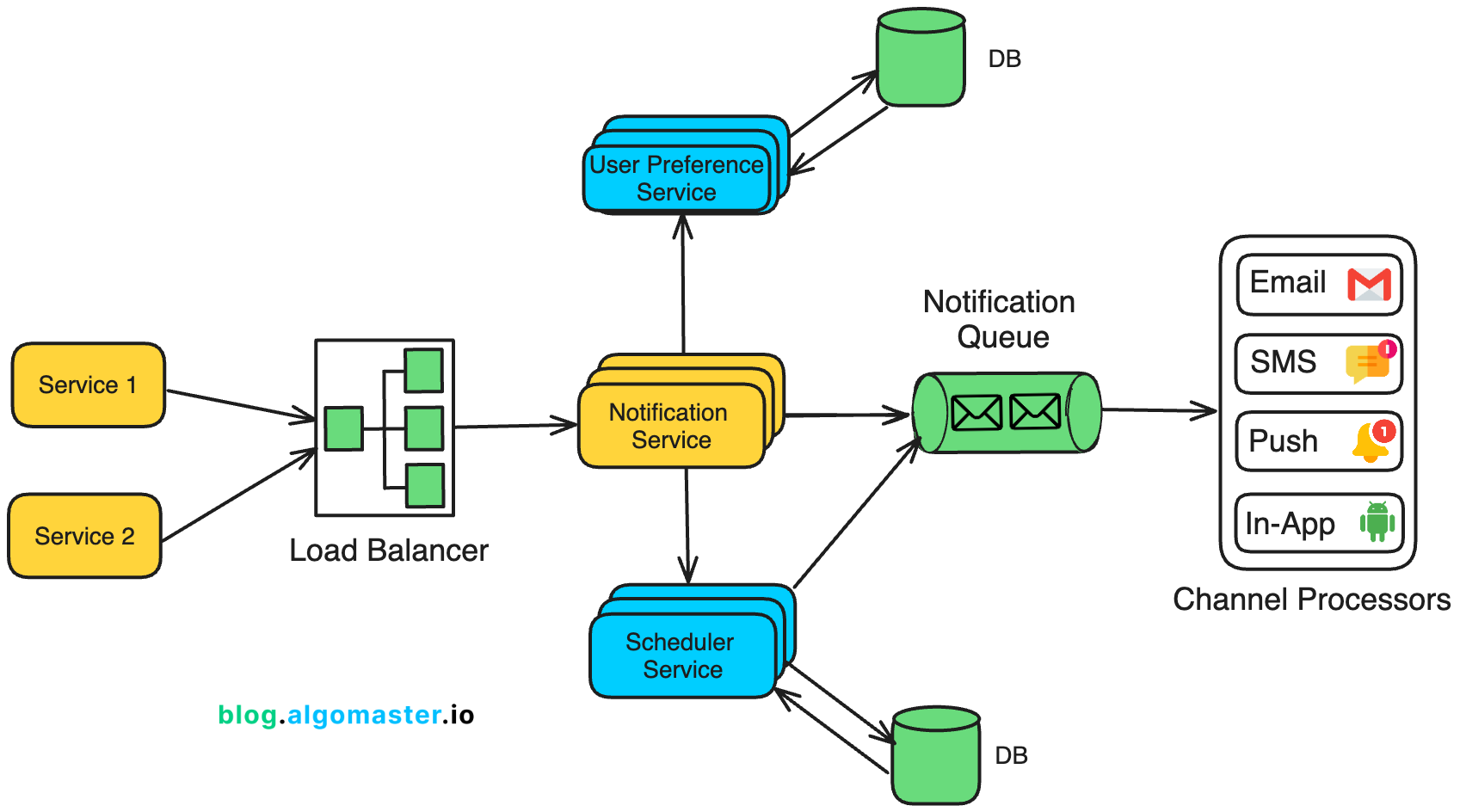

Components
- Client (Web or Mobile App)
- WebSocket Gateway Server
- Notification Service
- Message Queue (Kafka / RabbitMQ)
- Database (User preferences, tokens)
- Push Notification Service (FCM/APNs)
Flow
- Client connects → WebSocket server
- Backend sends events → Notification Service
- Notification Service pushes messages → WebSocket server
- WebSocket server → pushes directly to connected users
- If user offline → send push using FCM/APNs
- If WebSocket fails → fallback to long polling/SSE
5️⃣ Why WebSockets are ideal for notifications
✔ Real-time
No delay, instant updates.
✔ Persistent connection
No repeated HTTP overhead.
✔ Scalable with sharding + pub/sub
Used by WhatsApp Web, Slack, Zomato, Uber.
✔ Bi-directional
Client can send “seen” or “read” receipts.
6️⃣ When NOT to use WebSockets?
- Very low-frequency notifications (once per hour)
- Very large user base with very low active connections
- Systems where persistent connections are expensive
In these cases → SSE or long polling is enough.
🎯 Final Recommendation for Interviews
Say this:
For a notification system, I will use WebSockets for real-time in-app notifications because they provide low-latency bi-directional communication. For mobile, I’ll integrate FCM/APNs for push notifications. If WebSockets fail, I’ll fall back to SSE or Long Polling to guarantee delivery. All notifications will be sent via a message queue like Kafka for scalability.
This answer is perfect and shows strong system design understanding.